Construction Cost Tracking: Tips and Tools for Builders (With Workflows in Buildern)


Reviewed in June 2026
Construction cost tracking can feel like a never-ending headache. There are some overall problems, like unexpected costs and lack of visibility, that may lead to construction budget overruns.
However, there are more specific issues. For example, a bill arrives without a purchase order attached. A change order gets approved verbally or in a spreadsheet and is never reflected in the budget. A subcontractor invoices you twice the purchase order amount, and you don’t catch it until three weeks later.
These are real case scenarios that the contractor may face. This blog, built from real conversations with contractors, will cover some best practices for construction cost tracking with construction management software.
Table of Contents
- What is Construction Cost Tracking?
- Why Most Builders Struggle With Cost Tracking
- Spreadsheets vs. Construction Management Software for Cost Tracking
- 5 Best Practices for Construction Cost Tracking
- How Buildern Handles Construction Cost Tracking End-to-End
- The Bottom Line

What Is Construction Cost Tracking?
Construction cost tracking in construction means recording, monitoring, and comparing what a contractor has planned to spend against what’s actually spent during the project.
The spending across labor, materials, subcontracts, equipment, and overheads has to be monitored for every project in real time. It’s distinct from cost estimating, although sometimes these terms are used interchangeably. Estimation happens before the project starts, while cost tracking happens during the project. It tells you whether your estimates were right, where you’re
Thus, when done properly, cost tracking gives a contractor:
- A live comparison between estimated and actual costs by category
- Visibility into committed costs (subcontracts) before bills are issued
- A clear record of every approved change order and its impact
- Ongoing visibility into contingency usage (remaining funds for unexpected costs)
When tracking is not timely and accurate, the contractor risks seeing budget overruns.
Recommended reading:
Why Most Builders Struggle With Cost Tracking
The importance of cost tracking is clear; the failures are mostly operational. In Buildern’s experience, here’s where things may break down:
Change Orders Approved Verbally or in Spreadsheet: When a client asks for extra work and you deliver it without a formal change order, that cost either gets buried in the budget with no recovery or gets missed from a client invoice entirely.
Labour Costs Not Reconciled Against Budget: A worker tracks hours in a messenger or in a tool that is not connected to your accounting and budgeting. The job gets done, but those hours never appear as an actual cost.
Costs Assigned to Wrong Project or Wrong Phase: In a multi-project operation running on spreadsheets or loosely connected tools, a bill gets logged against the wrong job. This may happen by mistake or because the person entering it isn’t sure which cost code applies.
Accounting and Project Data Are Not Synced: When working without a single platform, a problem may arise when the bills are entered into accounting software while project budgets are updated manually. Over time, project teams and accounting teams end up working with different numbers.
Cost Codes Are Used Inconsistently: It is unlikely in a small team, but it may happen when an estimator and an accountant use different tools. The estimator builds the quote in a spreadsheet or estimating software using their own category logic. The bookkeeper enters bills into QuickBooks using the chart of accounts they always use. A specific cost code may become a “subcontractor” in QuickBooks.
Recommended reading:
Spreadsheets vs. Construction Management Software for Cost Tracking
Spreadsheets have long been the default tool for contractors. It’s natural that the question of how construction management software can replace them comes up in almost every Buildern demo.
Builders who are still running costs through spreadsheets typically describe the same situation. They have different spreadsheets for the estimate, tracking bills, and invoices. Meanwhile, QuickBooks or Xero, which they use for accounting, doesn’t quite match either of them.
Here’s where the difference actually shows up in practice:
Double-Entry Problem: In a spreadsheet workflow, every bill gets entered at least twice. When something is entered differently each time, there are two records. By the end of a project, reconciling them takes hours. In Buildern, for instance, a bill created and approved in the project syncs to QuickBooks or Xero automatically.
Committed Costs Are Invisible: A spreadsheet shows what you’ve spent. It can’t show what you’ve committed to spend, for example, purchase orders issued but not yet billed.
Change Orders Get Lost: In a spreadsheet workflow, a client-approved change order either gets manually added to the budget tracking file or it doesn’t. Either way, it has to be manually added to the next invoice too.
No Audit: If something looks wrong, the only way to investigate and to find a gap is to dig through emails and paper invoices to reconstruct what happened. In Buildern, the numbers in the budget are clickable. It links to the exact bill, change order, or timesheet that produced it.

5 Best Practices for Construction Cost Tracking
While every project is unique, certain strategies help builders maintain budget control and prevent financial surprises. Knowing what works best for your company, whether through systematic data collection or tracking software, is crucial.
We will further cover 5 field-tested approaches that our construction fellows practice to stay within the budget and have transparent financial flows.
1. Establish a Detailed Budget Before Work Begins
And by this, we mean developing thorough construction estimates to have a solid starting point.
Start with precise measurements in your takeoff plans to calculate the amount of material and labor needed for each specific task. Use your team’s experience to estimate the number of work hours required, then determine the hourly rate per worker.
A detailed budget that accounts for all expenses, from labor to materials and permits, will set the foundation for efficient cost tracking. This initial evaluation should also include a contingency amount of 1%-3% of the project’s hard costs. Having this buffer in place will help cover any unforeseen expenses that may arise during construction.
How can you make this easier?
Having a well-developed budgeting plan eliminates guesswork and helps identify potential issues from the start.
However, to have a realistic overview of all project costs requires a scrupulous approach to budgeting and sharp attention to the details. This can be challenging if you run multiple projects simultaneously and need to focus on financial management while keeping track of other tasks.
This is where technology can be a great asset. Construction management software, such as Buildern, offers advanced project management and estimation features that help create accurate budgets and track expenses in real time.
2. Promote Clear Communication Between All the Stakeholders
A culture where everyone is on the same page is half the project’s success. Without it, miscommunication and lack of understanding between stakeholders can lead to costly delays.
This is clearly seen in the following numbers.
Over 76% of companies with effective communication policies manage to stay within the estimated budget, as opposed to the 48% that don’t have a well-established system.
3. Establish Cost Categories for Better Control
Cost categorization into subgroups like labor, material, equipment, and other essential project costs.
Cost codes in construction are numerical or alphanumeric systems used to categorize various costs associated with a construction project. These codes help organize a project’s financial aspects by allowing managers to allocate costs to specific tasks, phases, or types of expenses.
For example, while using construction project management software, you may assign labor costs from the 02.00 category. This code is then further divided into sub-categories like 02.01 for electricians, 02.02 for plumbers, and so on.
You can either create your own cost tracking system or use one of the internationally accepted systems like:
- CSI Standard Construction Cost Codes
- NAHB Standard Home Builder Cost Codes
4. Use Construction Cost Estimating Software
Keeping the entire budget under control can be tough, especially when there are many moving parts, including the constantly changing supplies and labor costs.
Construction estimating software helps automate the process of tracking expenses by providing real-time financial updates and other essential insights. You can get a detailed breakdown of your WIP and WIPAA reports (data otherwise to be calculated manually) in a few clicks.
Why does your company need all this information?
It goes beyond being “nice to have” information.
Lacking precise reporting and estimating tools, you risk running out of money and losing control over what is actually being spent.
This can lead to underbilling or overbilling undermining your brand’s credibility. To avoid this, it’s essential to track all financial information, including bills, expenses, purchase orders, change orders (variations), and timesheets. Implementing all the estimating with reliable software will help create accurate financial fundamentals for future projects.
💡Recommended reading
5. Be Open to Budget Adjustments
With the dynamic nature of the construction industry, there are always unforeseen costs and changes that can occur during a project. Whether driven by uncontrollable conditions, design modifications, or the client’s new requirements, these changes can significantly impact the project budget. Thus, it is crucial for you to remain alert and responsive to such developments.
One thing is having the already discussed contingency fund. Again, this will help you to cover any costs that are outside of your initial estimate.
You can also work with construction allowances, providing a predetermined budget for specific items or aspects of a project that may not have been fully defined at the outset. These are used as flexible spending limits to manage costs for finishes and materials, such as fixtures, flooring, or countertops.
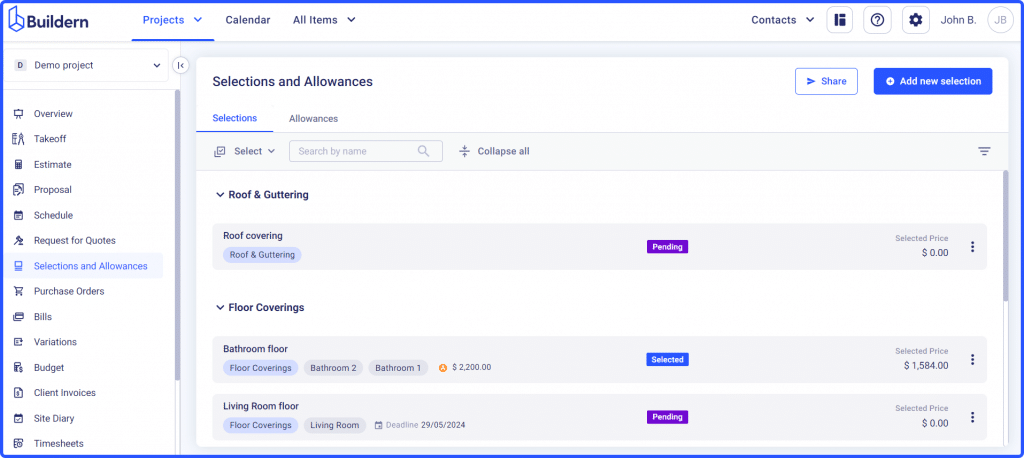
Allowances make the selection process easier and clearer for your clients and you.
Another thing to help you with budget adjustments is the use of change orders, otherwise called variations. These are official amendments to the original project estimate that clearly outline any new work, material alterations, or revised costs.
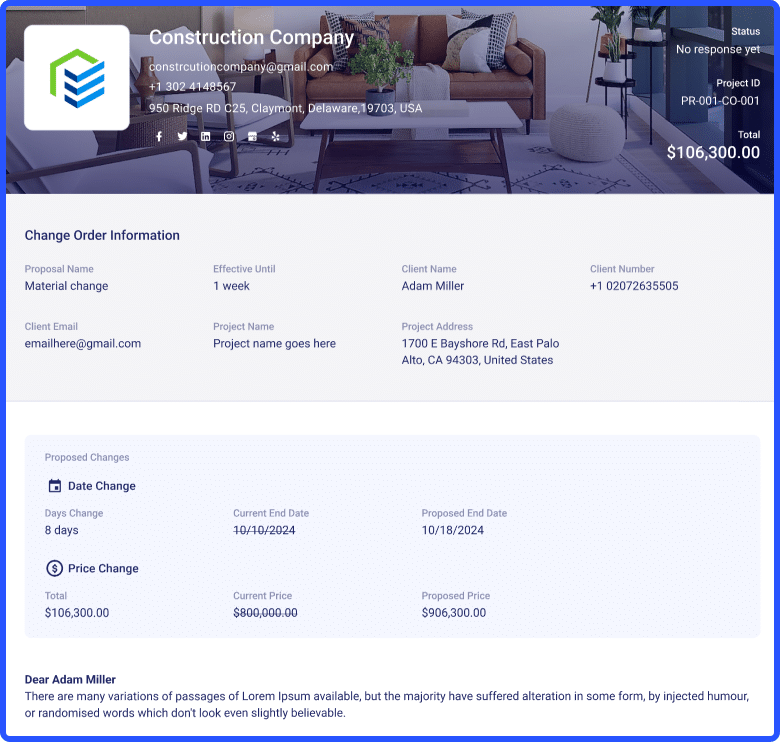
By documenting changes through formal change orders, you can maintain transparency with clients, ensure that all parties agree to the modifications, and effectively manage the financial implications. This practice not only allows for better budget control but also enhances project communication and overall execution.
How Buildern Handles Construction Cost Tracking End-to-End
The biggest advantage of using dedicated construction management software is that it has all the needed tracking features in one centralized platform.
Accurate cost tracking requires ongoing data comparison and monitoring of all bills, expenses, timesheets, purchase orders, and change orders (variations). This can become a real-time consumer when you don’t have a specialized solution to support it. In Buildern, there is no need to switch from one tool to another.
Here is how the most common issues are solved:
Original vs. Actual Costs
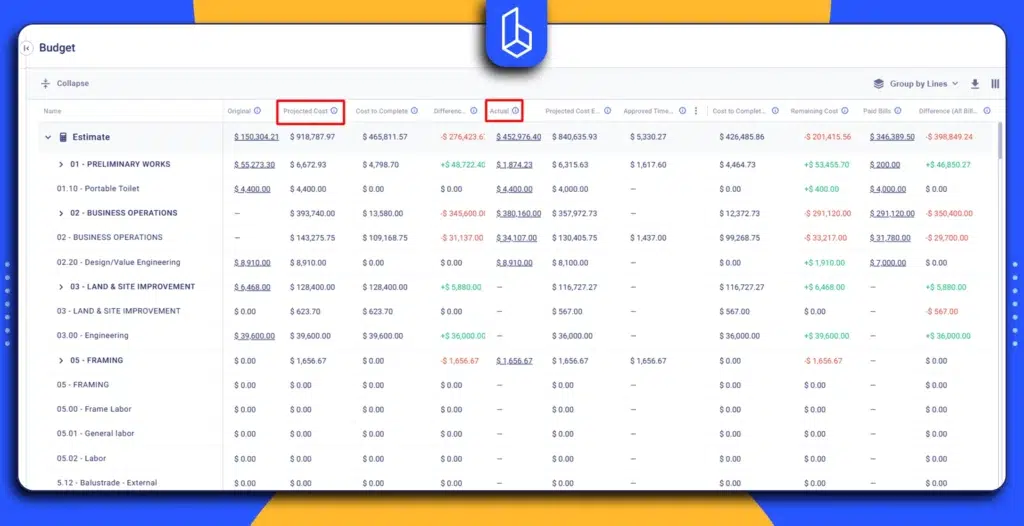
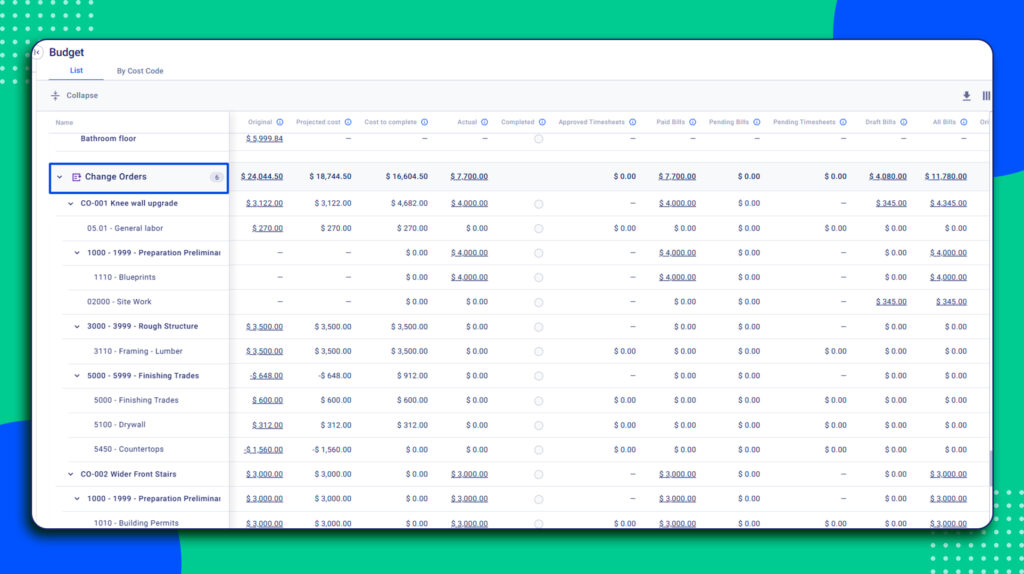
The budget in Buildern is the central financial dashboard of the project. The budget module gives contractors real-time visibility into project finances by tracking key metrics. Among them is the original cost, comparing it against the actual and projected cost, and the cost to complete.
Tip: The budget view is highly customizable. In addition to these core metrics, you can choose from many other columns and financial indicators to build a budget view that matches your team’s workflow and reporting needs.
Change Orders That Actually Reach the Invoice
Every variation in Buildern is created as a formal change order with line items, pricing, an approval deadline, and a client signature collected digitally. The client approves by clicking a link, reviewing the itemised cost and time impact, and signing on screen. You get an immediate notification. Once approved, the change order updates the budget automatically with no manual transfer between the modules.
Cost Catalog for Consistent Tracking
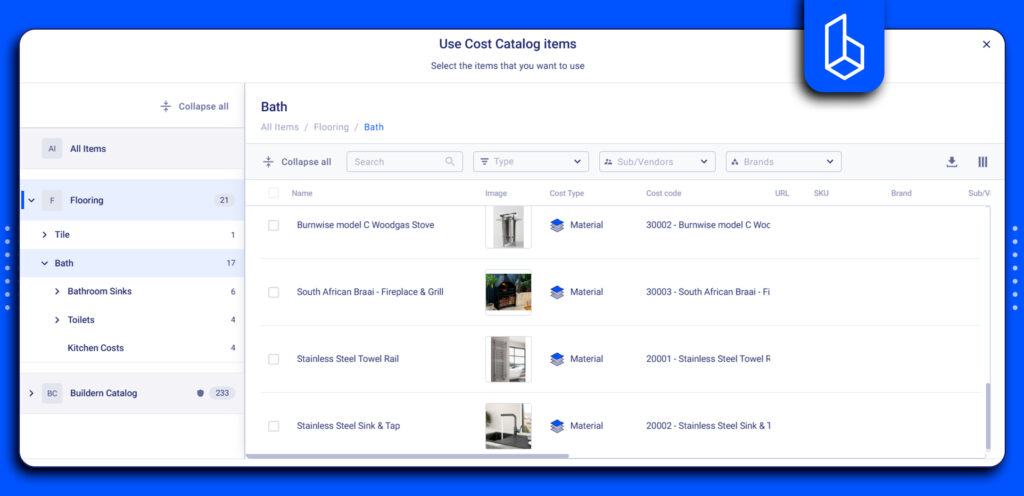
For cost tracking specifically, the cost catalog solves a consistency problem. Every item saved in the catalog carries its cost code with it. That means every estimate built from catalog items uses the same categories automatically.
Besides, the cost catalog can be imported in bulk, which is one of the main concerns the builders have. The advantage of using construction software is that it eliminates the need for manual entry. When prices change, the software also flags which estimates are affected so nothing gets missed.
No More Double-Entry With QuickBooks and Xero
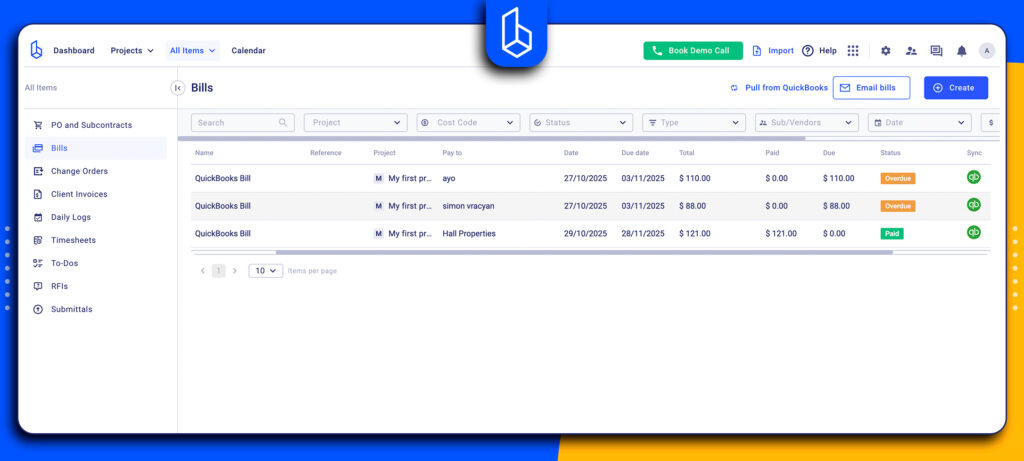
With a two-way sync, a bill created and approved automatically goes to Xero and QuickBooks and vice versa. Client invoices work the same way: created in Buildern, synced outward, payment status returned automatically.
The Bottom Line
Cost tracking may be considered by some as the administrative part of construction. However, most of the problems builders face mid-project and at handover aren’t site problems. They’re financial visibility problems.
Construction management software solves the problem of connectivity. When using it, the estimate, budget, client invoices, and accounting are consolidated in one platform. An approved change order updates the budget and becomes available on the next invoice without anyone copying data between systems.
The result is that the builders can see mistakes or problems earlier, when there’s still time to act.
Construction cost tracking doesn’t have to be a burden. With the right software, it runs alongside the project rather than behind it.